
From Capture to Final Image

Photo Retouching

Here’s where the magic happens. Skin is refined, color is balanced, distractions disappear, and the strongest parts of the photograph come forward. Some images need a light touch. Others need a full transformation. The result should feel polished, intentional, and completely believable.

West African Model, Rahel

Rahel was a tall, striking model with expressive eyes and a captivating smile. Her skin showed several blemishes and she perspired quickly under the studio lights, so the images required significant retouching. The finished photographs achieved a polished, magazine-quality result.
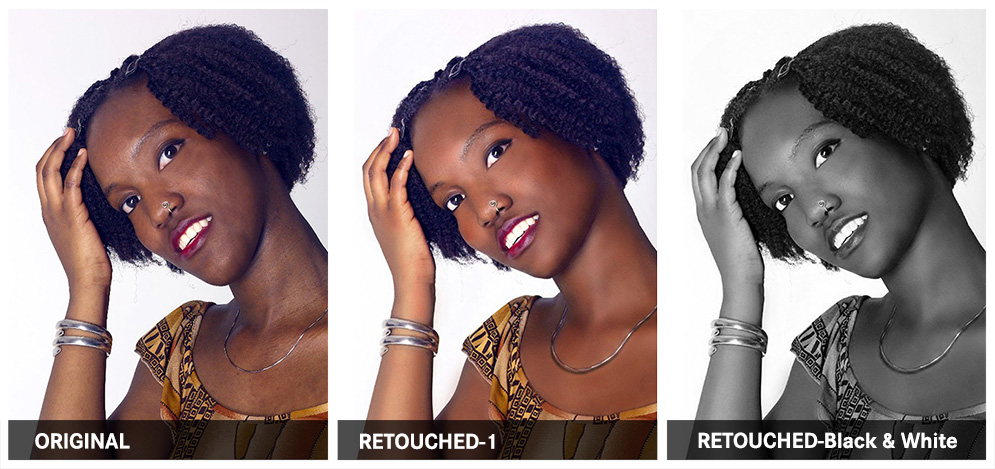
West African Model, Rahel photo retouching example 1 — Webphotographix

What Was Done

  • The shadows were lightened in Adobe Photoshop, so as to reveal hidden detail.
  • To remove skin blemishes and scars, the Healing Brush was applied to the problem areas.
  • To create natural, healthy-looking skin tones, various colour samples were taken from the model's skin. The Airbrush tool was then used to fix skin blemishes, such as spots and pimples, and even out skin tones.
  • The image was then passed through PortraitProfessional, where the touch-up tool was used. In conjunction to subtly reshaping the face and narrowing her eyes, her skin was enhanced by removing all grease, sweat and shine from the model's skin. All this was done while retaining the model's original skin texture.
  • A copy of the colour photo, was then converted to black and white.

PHOTOGRAPHY AND RETOUCHING DONE BY GISELLE WHITE OF WEBPHOTOGRAPHIX