
From Capture to Final Image

Photo Retouching

Here’s where the magic happens. Skin is refined, color is balanced, distractions disappear, and the strongest parts of the photograph come forward. Some images need a light touch. Others need a full transformation. The result should feel polished, intentional, and completely believable.

Cambodian Model, Camden Sang

Camden was a professional model with strong features and an expressive physique. His photographs required only light retouching to reduce minor skin blemishes and improve the studio lighting.
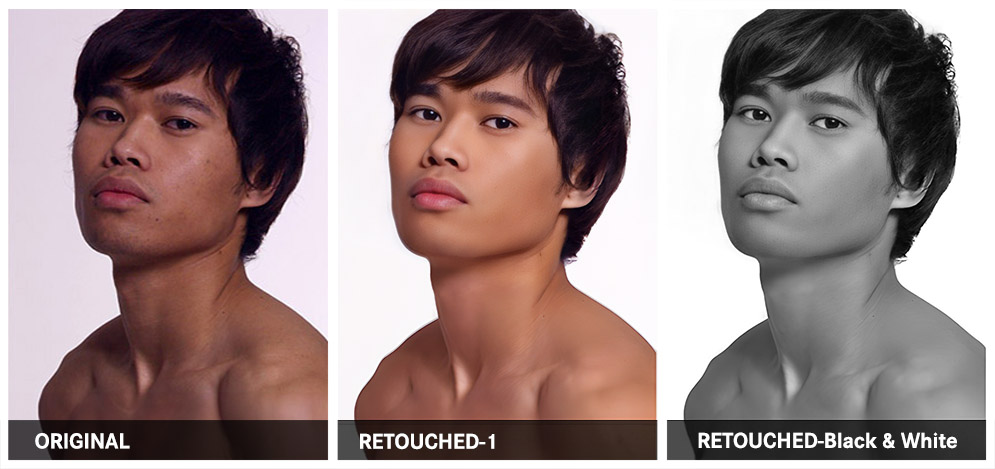
Cambodian Model, Camden Sang photo retouching example 1 — Webphotographix
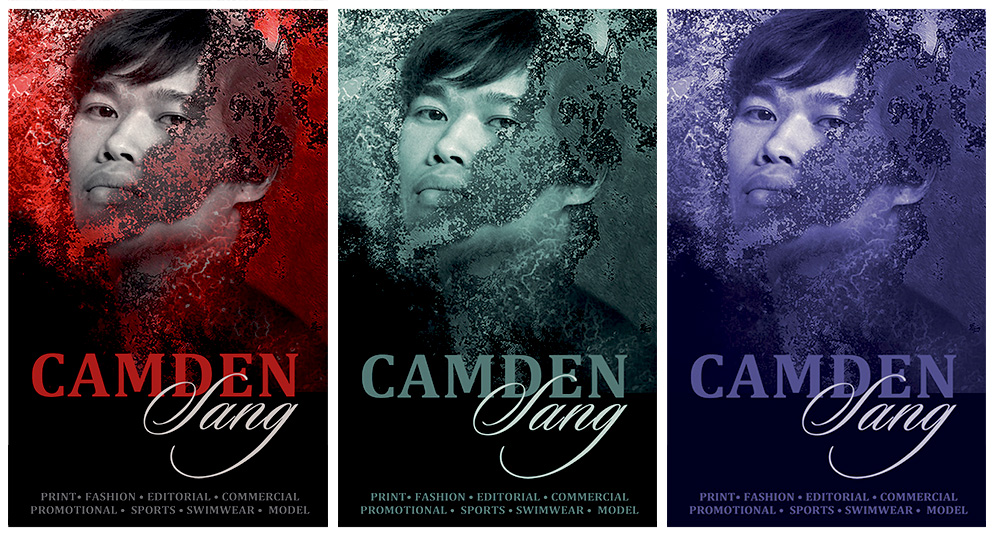
Cambodian Model, Camden Sang photo retouching example 2 — Webphotographix

What Was Done

  • To create natural, healthy-looking skin tones in Adobe Photoshop, various colour samples were made of the subject's skin. The Airbrush tool was used to smooth uneven skin tone.
  • The Healing Brush was then used to remove skin blemishes.
  • The brightness, contrast, and exposure levels were adjusted to reintroduce some of the natural light fall against the skin.
  • The photo was then converted to black and white.
  • The black and white photo was then retouched using various colour filters and textured overlay effects, to create branded posters.

PHOTOGRAPHY AND RETOUCHING DONE BY GISELLE WHITE OF WEBPHOTOGRAPHIX